 BOTCAMP
- BotCamp
- /
- Go live from PC
PC streaming
Go live from your PC
Stream straight from Windows or Mac with OBS Studio: full game quality, screen capture, overlays, the lot. Ten minutes from download to live.
Setup
Four steps to live
OBS is the free, open source streaming app the whole industry runs on. Grab it for your system, no account needed.
Sign in to BotCamp Studio on the web. Your personal server address and stream key are on the dashboard, with copy buttons.
Server
rtmp://botcamp.app:1935
Stream key
found in your Studio dashboard

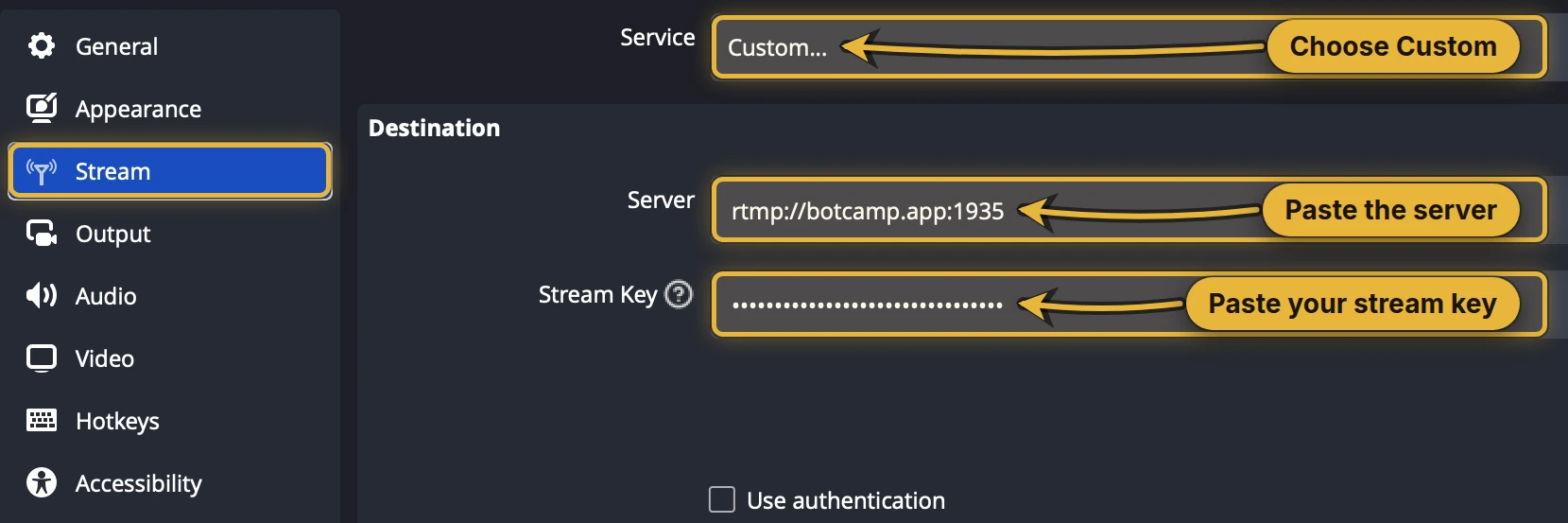
In OBS open Settings then Stream and set:
Service → Custom
Server → rtmp://botcamp.app:1935
Key → paste yours from Studio
Add your game or screen as a source, hit Start Streaming in OBS, and press Go Live in Studio. Your stream appears in the arena the moment your feed is rolling.
Viewers, gifts and battles work the same as the app.

Dial it in
Settings that never choke
These are the settings we run battles on. The one that matters most: use your hardware encoder, not x264. Software encoding fights your game for CPU and loses.
Mac (M series / Intel)Apple VT H264 Hardware
NVIDIA GPUNVENC H.264
AMD GPUAMD HW H.264 (AMF)
Intel iGPUQuickSync H.264
Found in: Settings → Output, and Settings → Video
Troubleshooting
Viewers see a black screen?
Your preview looks perfect, the thumbnail on your profile updates, everything says you are live — and viewers get nothing but black with sound. That is almost always B-frames. Your encoder turns them on by default, and the low-latency player phones use cannot decode them. Nothing warns you, because your own machine decodes them fine.
Set Output Mode to Advanced, then on the Streaming tab set B-frames or Max B-frames to 0.
On Mac, Apple VT also has a Use B-Frames tick box. Untick it.
Staying in Simple mode? Tick Enable Custom Encoder Settings on Settings → Output and put this in the box:
bframes=0
Then Apply, OK, and restart the stream — encoder changes only take effect on a fresh connection.

Software (x264) in Simple mode.
Troubleshooting
Nothing shows at all?
If the picture never appears on any device, check what resolution you are actually sending. On a Retina Mac or a high-DPI monitor, capturing your whole screen can push out something like 2776 × 1284 — wider than most phones can decode at all, so the player connects and shows black.
Settings → Video. Leave Base (Canvas) at your screen size and set Output (Scaled) Resolution to 1280 × 720. That one field is what gets sent.
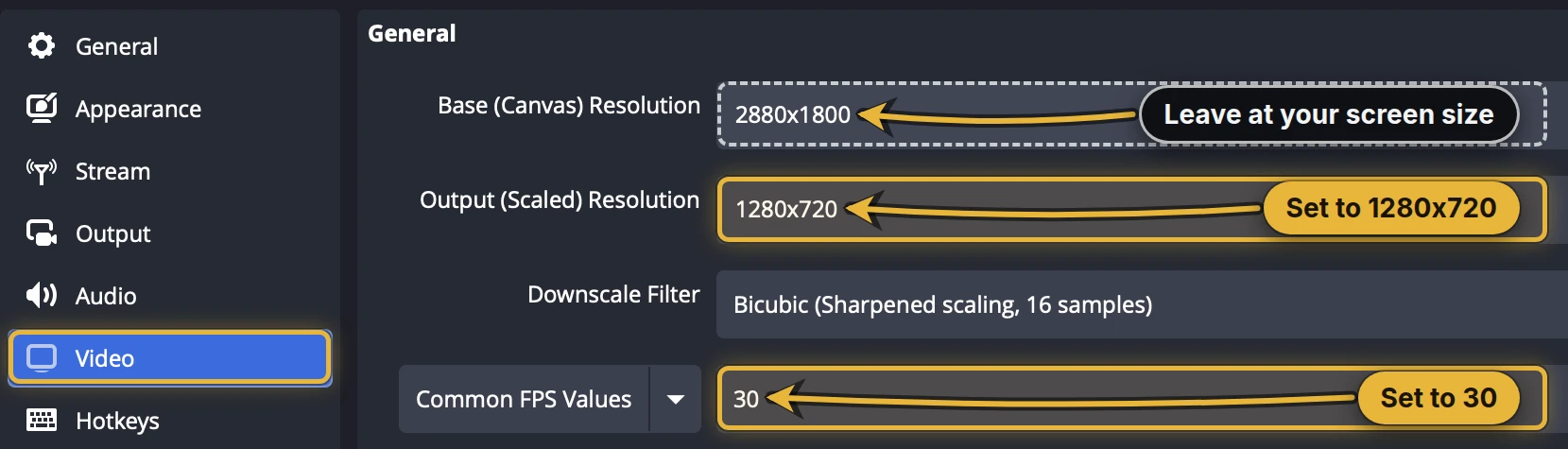
2500 Kbps spread across a 2776-wide frame is starved and blocky. At 720p the same number looks sharp.
Troubleshooting
Viewers say it's lagging?
Nine times out of ten the stream is choking before it leaves your PC. OBS calls it Encoding overloaded. Your encoder cannot keep up with the game, so frames arrive late and viewers see stutter. Here is the fix order:
The single biggest fix. Settings → Output → Encoder, pick the hardware option from the table above. x264 on CPU while also capturing your screen is what melts machines.
Settings → Video. A clean 720p30 beats a stuttering 1080p60 every single time.
Higher bitrates do not survive most upload connections. Steady 2500 CBR keeps the feed smooth for viewers on mobile data.
Browsers with 40 tabs, video calls, second capture apps: each steals encoder headroom. Game plus OBS is the loadout.
Ready
Key in hand, arena's open
Sign in to Studio for your stream key, earnings and gifts, and keep the app on your phone for chat, squads and battles on the move.